Free
Website security headers
Whether your website tells browsers to block clickjacking, script injection and insecure cookies.
Reads the headers your site already sends to every visitor.
10 checks
Our free website security scan checks your security headers, SSL/TLS certificate and DNS records in about a minute. It shows the weaknesses attackers look for first and sends you a score, a grade and a private result by email. We only read what any visitor’s browser can already see.
Wrong address? Cancel and start again.
Public information only: DNS, the certificate the website presents, RIPEstat for the network and place, and RDAP for the domain registration.
The free result shows what is wrong. The full report shows how to fix it, where to make each change, and the evidence behind every result. You get it right after you pay, and we email you the link.
Secure payment by Stripe.
Every finding, with the steps to fix it. We also emailed these links to you. Keep that email: the links stay private to you.
Tip: give the fix file to Claude or another AI assistant and say, "Fix these with me, one at a time."
It is a scan of our own website. Scan your website for free to get the same kind of result in about a minute.
The latest 20 websites checked. Only the website name appears here, never the result. To remove a name, email [email protected].
See exactly how to fix each finding, where to change it, and the evidence behind it. It opens right after you pay, and we email you the link.
Secure payment by Stripe. See a sample report first
Six modules. Three are free for any website. Three connect to your own servers, so they unlock after you prove ownership.
Whether your website tells browsers to block clickjacking, script injection and insecure cookies.
Reads the headers your site already sends to every visitor.
10 checks
Whether the padlock is valid, old insecure versions are off and renewal will not catch you out.
Opens the same secure connection a browser opens and reads the certificate.
6 checks
Whether your domain name system is resilient, signed and free of leaked internal names.
Reads your public DNS records.
3 checks
Whether criminals can send mail pretending to be you, and whether your own mail reaches inboxes.
Reads your SPF, DKIM, DMARC and MTA-STS records. Included when you unlock the full report.
7 checks
Whether every mail server of yours offers encryption with a valid certificate.
Connects to your mail servers. Runs only for the verified owner.
1 check
Whether your name servers refuse to hand your full list of records to strangers.
Asks your name servers for a zone transfer. Runs only for the verified owner.
1 check
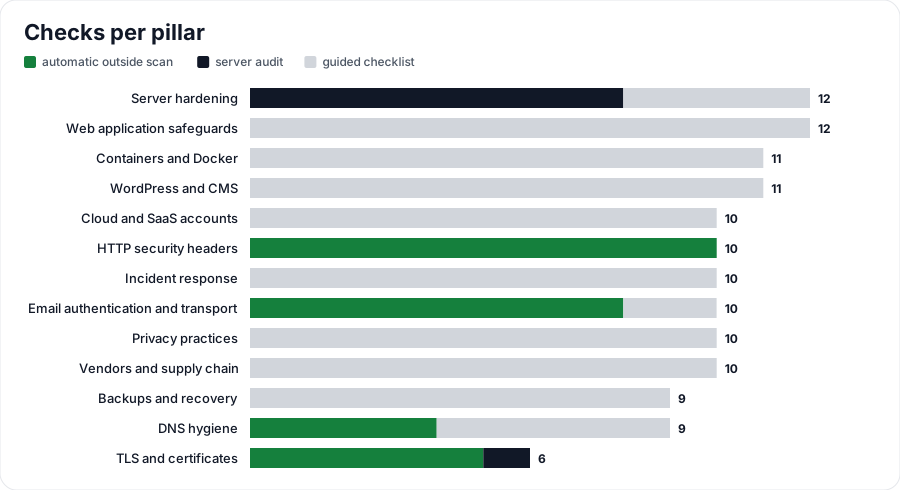
The free scan is the part of our security library that can be tested from outside, with no login and no changes to your website. The library is wider. It groups 130 checks into 13 pillars, and each check explains why it matters, how to test it, what a pass looks like and how to fix it.
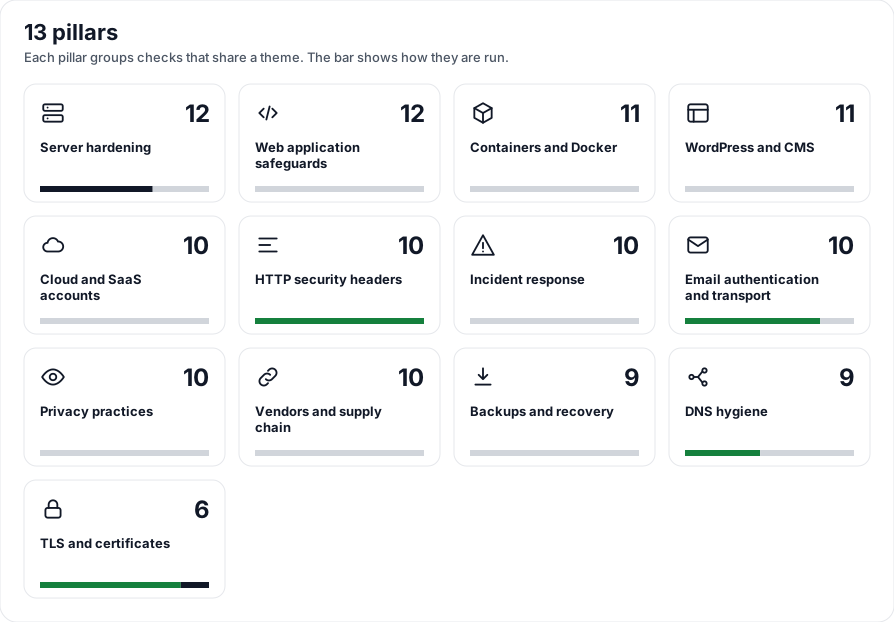
| Pillar | Checks | Where it runs |
|---|---|---|
| HTTP security headers | 10 | Automatic outside scan Free scan |
| TLS and certificates | 6 | Automatic outside scan Free scan |
| DNS | 9 | Automatic outside scan, plus checklist Free scan (3 checks); name server test after verification |
| Mail authentication | 10 | Automatic outside scan, plus checklist After ownership verification |
| Server hardening | 12 | Audit run on the server itself Not in this scan |
| Web application safeguards | 12 | Guided checklist Not in this scan |
| Containers and Docker | 11 | Guided checklist Not in this scan |
| WordPress and CMS | 11 | Guided checklist Not in this scan |
| Cloud and SaaS accounts | 10 | Guided checklist Not in this scan |
| Incident response | 10 | Guided checklist Not in this scan |
| Privacy and compliance | 10 | Guided checklist Not in this scan |
| Vendors and supply chain | 10 | Guided checklist Not in this scan |
| Backups and recovery | 9 | Guided checklist Not in this scan |
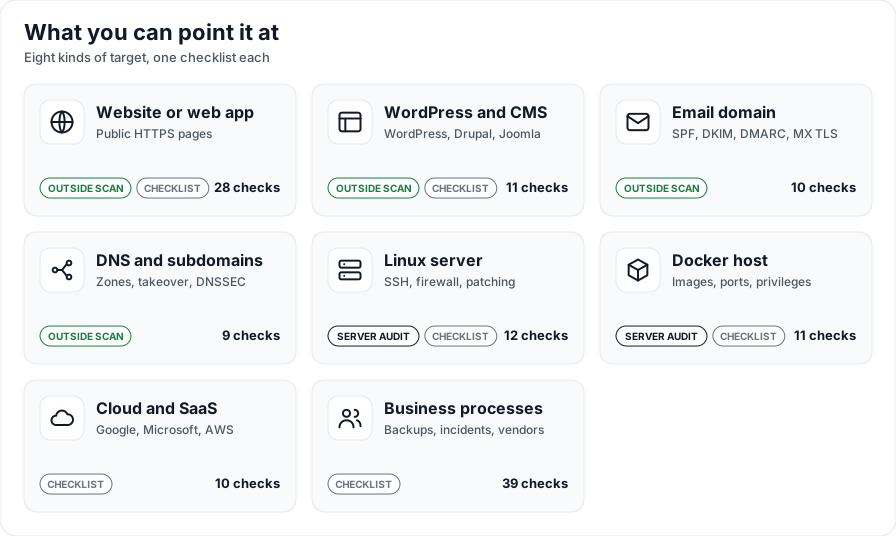
Pick what to scan. Website checks are free and ticked for you. Locked checks wait for ownership proof.
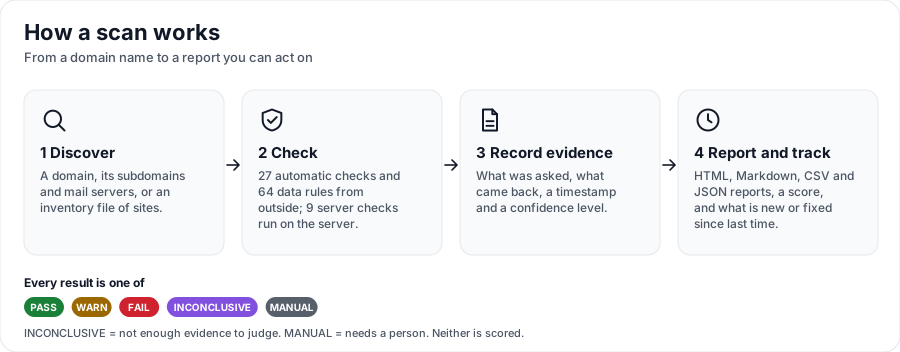
Headers, certificate and public DNS records, using ordinary requests. You see your place in line and the progress.
You see a score from 0 to 100 with a grade and a result link only you have. Fix instructions are in the full report.
The score starts at 100. Each failed check subtracts twice the weight of its severity and each warning subtracts it once, where critical is 10, high 6, medium 3 and low 1. Passed checks, and items we cannot judge from outside, cost nothing.
| Grade | Score | What it means |
|---|---|---|
| A | 90 to 100 | Strong base. Only fine tuning left. |
| B | 80 to 89 | Solid. A few hardening steps are open. |
| C | 70 to 79 | Basics are covered. Several gaps are worth closing. |
| D | 60 to 69 | Many gaps. An attacker has it easier than they should. |
| F | Below 60 | Serious gaps. Fix the failed checks first. |
Short answers about what the scan does, what it does not do and what happens with your result.
DaniMaster can fix your security headers, certificate and DNS settings, and run a deeper review of your website. Start with a free AI audit.